 Store
Operations
Orders where your team already works.
No new terminal on the counter and no software to learn. The manager panel is a Telegram app too — it opens on the phone already in the apron.
A new order announces itself
Every manager gets a message in Telegram, and the open panel plays a sound you chose yourself. Nothing sits unnoticed while the guest waits.
Statuses that match your kitchen
Choose the statuses your restaurant actually uses. Delivery-only steps stay out of the way when you do not need them.
Every change messages the guest in Telegram automatically, so nobody on your team types the same update twice a night.
Nobody took the order?
If an order stays New longer than you chose, the owner gets a message about it. Once per order, so it is a nudge, not noise.
The order list
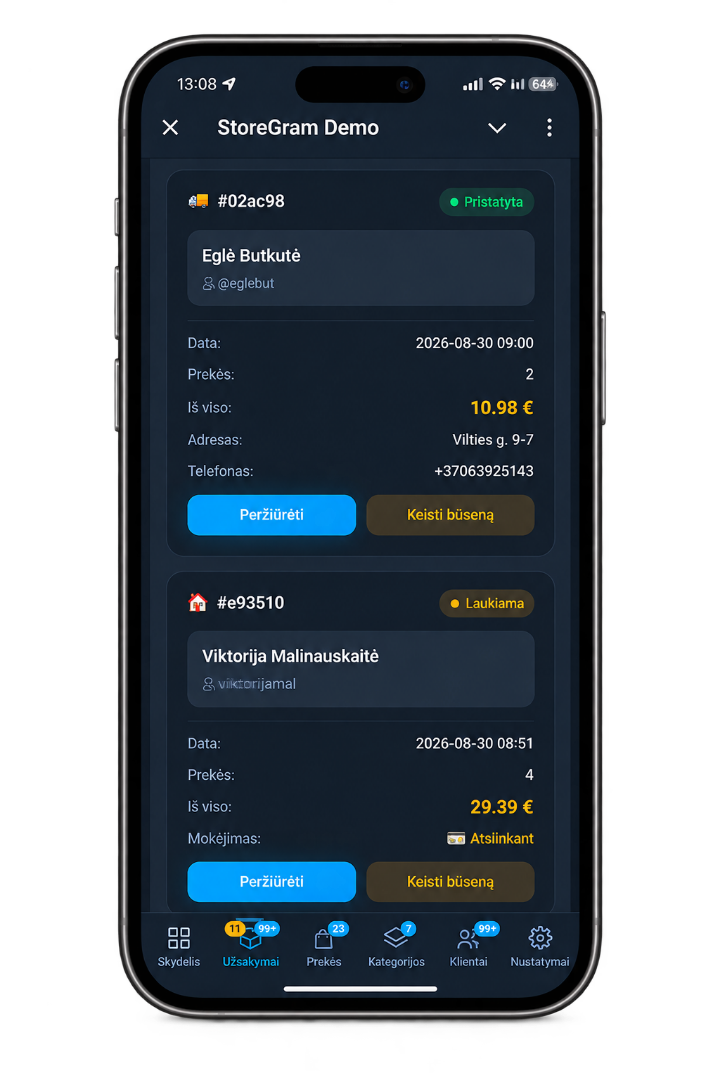
Delivery
Your couriers work in the bot.
Each delivery order arrives as a card in Telegram: Take it, the address in Google Maps or Waze, Delivered. /my shows what a courier is carrying right now, and a guest in Telegram gets a message at every step. In a small place where the owner drives too, they can get the same cards without giving up the panel.
Order hours
Nobody cooks at 3am.
Set the hours you accept orders — per weekday, with a break for lunch or a split shift, and a cutoff before closing so the kitchen can finish the last one. Hours that run past midnight work the way you would expect.
The menu stays open
Outside your hours the storefront does not go dark. Guests still browse and still fill a cart — only checkout is closed. A cart built at midnight becomes a breakfast order.
They get told when you open
A guest in Telegram can ask to be notified. When you start taking orders the bot messages them, with a reminder of what is waiting in their cart.
Late traffic stops being lost traffic
Pause any time
Kitchen down, private event, staff short — stop taking orders with one switch, without touching the schedule you set up.
Your menu
Everything editable from the phone in your hand.
Products
Add, edit, photograph, price, put in order, or take off the menu for a day.
Categories
Group the menu the way guests think about it, named in every language you sell in.
Languages
Choose which languages the storefront offers. Your panel can be in a different one.
Look and feel
Logo, name and storefront theme — set once, applied everywhere.
Sets and dish of the day
Build a set from dishes already on your menu. Give a dish its own days and hours — a lunch special on Tuesdays and Thursdays — and it can be ordered only then.
Stock
Count portions if you want to. The last one is reserved at checkout, and a sold-out dish can't go into a cart.
Your team
The right access for each person.
Owners control settings and payments. Managers handle products, orders, customers and campaigns. Couriers see only the orders they need and can mark collection payments as received.
Invite staff with a link
Send an invitation link instead of asking employees to find and type their Telegram ID. Links expire, and you can revoke one before it is used.
Payment details stay with the owner
Your payment provider keys and shop settings are not visible to managers or couriers — not hidden buttons, but access they do not have.
Your regulars
Remember what they always order.
The order card shows how many times this guest has ordered and what they take again and again — the garlic sauce, nine times out of ten. Put it in the bag before they ask.
Storegram Early Access
Free during Early Access.
We set up your bot, payments and menu together with you. We'll agree the terms after Early Access in advance — no surprises.